

Tracking your marketing campaigns is more critical than ever in 2025, and this is where UTM parameter best practices come in handy.
With cookies fading and cross-platform analytics becoming essential, relying on inconsistent or missing UTMs can lead to inaccurate reporting, making it difficult to know which campaigns drive conversions.
The solution? Following UTM parameters best practices ensures you capture reliable data, measure ROI, and make informed decisions.
By applying these tips with a UTM generator microapp, you can standardize your tracking and gain actionable insights across platforms.
What Are UTM Parameters and Why Do They Matter?
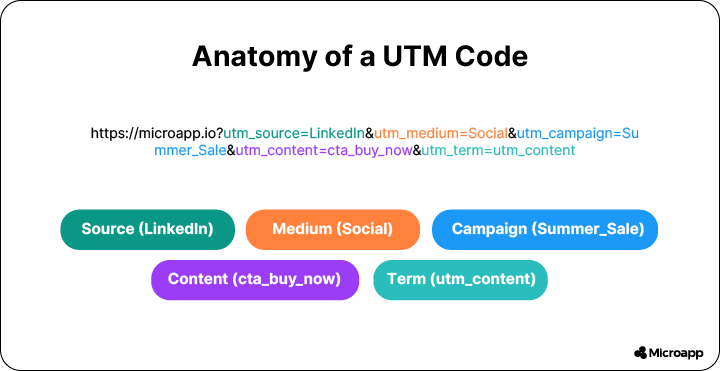
UTM parameters are small pieces of text added to URLs to help analytics tools track clicks, sources, and campaign performance. Here’s a breakdown:
- utm_source – the platform or website sending traffic (e.g., LinkedIn, Mailchimp).
- utm_medium – the channel type, like email, social, or paid ad.
- utm_campaign – identifies the campaign name (sale, event, promotion).
- utm_content – differentiates CTAs or creative variations.
- utm_term – tracks paid search keywords or A/B testing variants.
Benefits of UTMs:
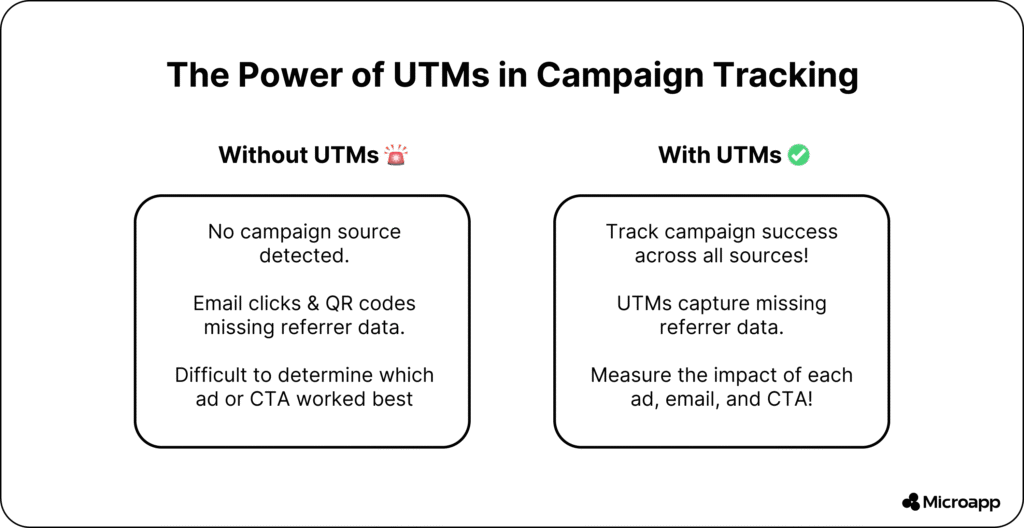
- Accurate cross-platform tracking.
- Independent of third-party cookies.
- Clear ROI insights for marketing campaigns.
💡 Tip: Use consistent lowercase letters and avoid spaces to ensure clean reporting.
💬 Will using UTM speed up my website?
UTMs are small text strings and do not affect page performance.
Best Practices for Each UTM Parameter
utm_campaign – Name Your Campaign Clearly
One of the best practices for using UTM parameters is to use concise and descriptive names. Avoid generic labels like “sale” or “campaign1.” Example:
utm_campaign=uk_winter_sale_2025
utm_campaign=leadgen-newmembers
💡 Tip: Include region, year, or campaign type for easy reporting across platforms.
utm_source – Identify the Traffic Platform
Always use lowercase names without the “.com” suffix. Examples:
utm_source=linkedin
utm_source=mailchimp
💡 Tip: Consistency avoids splitting your data across similar sources.
utm_medium – Define the Channel Type
Keep it simple:
utm_medium=social
utm_medium=email
utm_medium=paid-pr
💡 Tip: Don’t duplicate info from utm_source here. It ensures clean analytics.
utm_content – Track Links and Variations
Use this to differentiate CTAs or placements:
utm_content=sidebar
utm_content=main-feed
utm_content=video-banner
💡 Tip: Use this for A/B testing creative or placement.
utm_term – Track Keywords
Great for Google Ads or email A/B testing:
utm_term=womens_black_boots
utm_term=valentines_promo
💡 Tip: Helps determine which keywords or email subject lines drive clicks.
Custom Parameters
For campaign-specific details: &geo=orlando, &affiliate=brian-poarch
| Parameter | Purpose | Example | Common Mistakes |
|---|---|---|---|
| utm_source | Platform | Mixed case, inconsistent spelling | |
| utm_medium | Channel | social-cpc | Duplicate info from source |
| utm_campaign | Campaign | valentines-2025 | Generic names like “sale” |
| utm_content | Link placement | sidebar-banner | Missing or unclear identifiers |
| utm_term | Keyword/variation | black_boots_sale | Ignored in paid campaigns |
| Custom | Additional attributes | &affiliate=brian-poarch | Overcomplicating links |
💡 Tip: Use UTM Generator Microapp or internal spreadsheets to maintain consistency. Use custom parameters sparingly to avoid cluttering URLs. If you’re unsure about how to use UTM parameters, refer to this article.
💬 Can I convert UTM data to a microapp dashboard? Yes. Microapps can aggregate UTM reports for quick insights.
💬 How do I optimize UTM files? Keep them concise, lowercase, and aligned with GA channels (see next section).
Naming Conventions and Governance
Consistency is key. A structured UTM naming system ensures your team can read, sort, and analyze data without confusion.
GA Default Channel Grouping Mapping
| UTM Parameter | Example | GA Default Channel Mapping |
|---|---|---|
| utm_source | Social | |
| utm_medium | social-cpc | Paid Social |
| utm_campaign | valentines-2025 | Campaign-specific reporting |
| utm_content | sidebar-banner | Differentiates placement |
| utm_term | black_boots_sale | Paid keywords/targeting |
💡 Tip: Align UTMs with GA channels to ensure accurate cross-channel reporting. Maintain a cheat sheet in your spreadsheet or workflow for your team to reference.
Common Mistakes to Avoid
Even seasoned marketers make errors with UTM tagging that can skew analytics or make data unusable. Here’s how to spot and avoid the most common pitfalls 👇
1. Tagging Internal Links
UTMs should never be used for internal navigation links (e.g., from the homepage to a product page). Doing this will break user sessions and inflate referral traffic inside your own domain.
Bad Example:
https://www.microapp.io/blog/?utm_source=homepage&utm_medium=banner&utm_campaign=blog_click
Why It’s a Problem:
This tells Google Analytics that your homepage is a referral source, which resets session data and gives false attribution.
Fix:
Use UTM parameters only for external campaigns (such as social, email, or paid ads). For internal tracking, rely on event tracking or custom dimensions to accurately track events.
2. Using UTMs on Organic or Natural Referrers
Adding UTMs to links that already appear in organic or direct traffic (such as SEO-driven links or guest posts) will distort actual organic performance.
Bad Example:
https://www.microapp.io/?utm_source=google&utm_medium=organic&utm_campaign=seo
Why It’s a Problem:
You’re artificially tagging organic traffic as a “campaign,” so GA no longer counts it as “Organic Search.”
Fix:
Let Google Analytics automatically detect organic traffic. Use UTMs only for manual marketing efforts (ads, newsletters, affiliates).
3. Mixing Uppercase and Lowercase
Analytics treats uppercase and lowercase as different values. So Facebook and facebook are counted as two separate sources.
Bad Example:
utm_source=Facebook&utm_medium=Social&utm_campaign=HolidaySale
Why It’s a Problem:
Your reports split traffic between “Facebook / Social” and “facebook / social,” leading to fragmented data.
Fix:
Always use lowercase for every parameter:
utm_source=facebook&utm_medium=social&utm_campaign=holiday-sale
💡 Tip: If multiple people create UTMs, set rules in your UTM spreadsheet or generator to auto-format to lowercase.
4. Duplicating Parameters Across Source, Medium, and Campaign
Each UTM field should represent a distinct layer of information. Repeating terms across parameters reduces clarity and makes filtering difficult.
Bad Example:
utm_source=facebook&utm_medium=facebook&utm_campaign=facebook-ad
Why It’s a Problem:
All parameters say the same thing — there’s no differentiation between channel, campaign, or placement.
Fix:
Assign unique values:
utm_source=facebook&utm_medium=paid-social&utm_campaign=spring-promo5. Overcomplicating URLs with Too Many Custom Parameters
Adding excessive or redundant parameters makes links unreadable and prone to manual tagging errors.
Bad Example:
https://www.microapp.io/?utm_source=linkedin&utm_medium=social&utm_campaign=summer-2025&utm_content=sidebar&utm_term=ad1&utm_affiliate=partner&utm_geo=usa&utm_device=mobile&utm_extra=bluebutton
Why It’s a Problem:
Long links look messy, can break in emails, and are hard to debug.
Fix:
Keep it clean and focused:
https://www.microapp.io/?utm_source=linkedin&utm_medium=social&utm_campaign=summer-2025&utm_content=sidebar
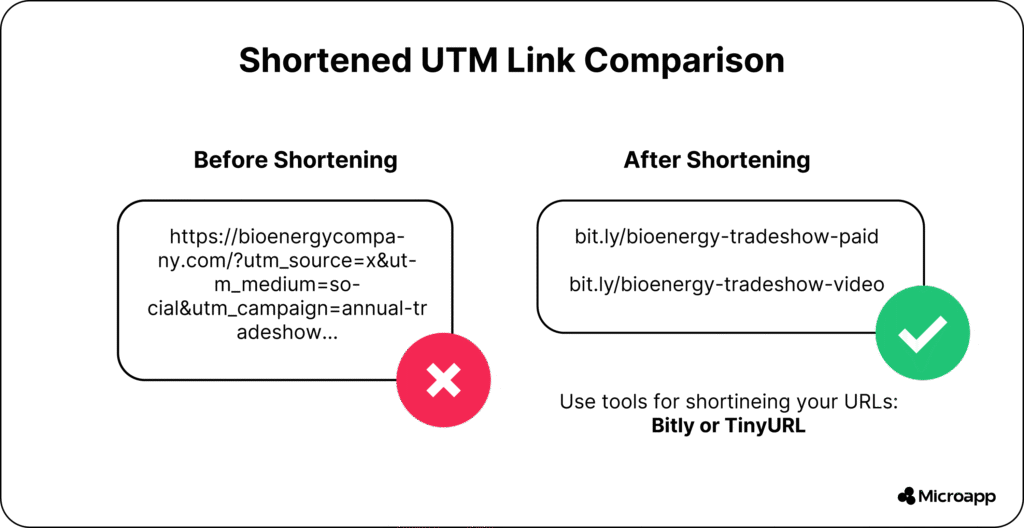
💡 Tip: Use a link shortener or a UTM builder microapp to keep links professional and consistent.
6. Forgetting to Use a Consistent Format Across the Team
If each marketer tags links differently, your analytics quickly become a mess of mismatched parameters.
Example of Inconsistency:
utm_medium=emailutm_medium=Emailutm_medium=mailingutm_medium=newsletter
Why It’s a Problem:
GA treats each one as a separate channel. You lose the ability to view consolidated “Email” performance.
Fix:
Create a shared UTM Naming Guide or use a Microapp UTM Template so every link follows the same conventions.
⚡ Automation Tip: Use a UTM Cleaner Script to remove unnecessary parameters or normalize case on page load automatically. It keeps URLs tidy without losing tracking accuracy.
When to Use UTMs
- Social media campaigns
- Email campaigns
- Paid ads and hybrid tracking with GCLID
- Affiliate and influencer campaigns
💬 When should I not use UTM? Avoid using it on internal links or natural/organic referrals.
💬 Are UTM links accessible for screen-readers? Yes—proper alt text ensures accessibility.
UTM Parameter Best Practices for Formatting
- Lowercase letters only
- Use dashes or underscores instead of spaces
- Keep links simple, concise, and readable
- Use link shorteners for long UTMs
🎯 Example:
https://microapp.io/?utm_source=linkedin&utm_medium=social-cpc&utm_campaign=valentines-2025&utm_content=sidebar-bannerPutting UTM Data to Use
- Compare organic vs paid campaigns
- Track A/B testing with
utm_content - Attribute ROI across multiple platforms
- Generate actionable insights for budget allocation
💬 Which platforms support UTM tracking best? Google Analytics, Facebook Ads, LinkedIn Ads, and email tools.
💬 Can UTMs be indexed by Google? Yes, they’re readable in analytics but generally ignored by search ranking algorithms.
Tools and Resources
- UTM Generators
- Spreadsheet templates for governance
- Microapps for tracking UTMs
- AI-assisted campaign tracking: OpenAI
- Social media scheduling and automation: Social Media Scheduler App
- Marketing automation and email tools: Lean Team Tools, Best Email Marketing Tools
Start Tracking Smarter: Build Your UTM Links Today
Mastering UTM parameter best practices isn’t just about clean URLs; it’s about making your marketing data work for you.
By avoiding common mistakes, adhering to consistent naming conventions, and employing effective UTM strategies, you’ll gain clearer insights, improved attribution, and more reliable ROI tracking across every campaign.
✨ Whether you’re running social ads, email campaigns, or affiliate promotions — UTMs are your best friend for transparent analytics.
Ready to simplify your tracking process?
👉 Build your UTMs now with Microapp and start seeing the real performance behind every click.