


If you’re working with APIs, you already know how crucial they are to your applications’ performance and reliability.
But testing them manually can be slow, error-prone, and nearly impossible to scale. That’s where REST API automation testing comes in.
Automating your REST API tests ensures faster feedback, better coverage, and more consistent results. Yet, even with automation, developers like you face challenges that can slow down your workflow.
In this article, we’ll explore the top challenges in REST API automation testing and demonstrate how to overcome them, thereby boosting your efficiency, security, and confidence in your APIs.
Learn more about API testing basics in our guide: What is API Testing?
What is REST API Automation Testing?
REST API automation testing is the process of using scripts and tools to automatically validate the functionality, performance, and reliability of REST APIs.
Instead of testing endpoints manually, automation allows you to run repetitive tests, check responses, and validate data with precision.
Why it matters: Automation saves time, ensures consistency, and allows testing at scale, especially when dealing with complex workflows or frequent deployments.
🔗 Related: Learn about how to simplify API testing to save time and effort.
📝 Tip: Start small by automating the most critical endpoints first — the ones that impact user experience or system stability the most.
Why REST API Automation Testing is Important
Automating your API testing workflow provides multiple benefits:
- Speed: Run tests faster than manual checks.
- Reliability: Reduce human error and ensure consistent results.
- Coverage: Test multiple endpoints, parameters, and edge cases simultaneously.
- Integration: Combine tests into CI/CD pipelines for continuous feedback.
📝 Tip: Use automation to catch issues early in your development cycle — the sooner you detect a problem, the quicker it is to fix.
💬 Will automation speed up my API testing process?
Yes. Automation allows repeated performance testing at scale without manual intervention, ensuring your APIs remain fast and reliable.
Top 7 Challenges in REST API Automation Testing
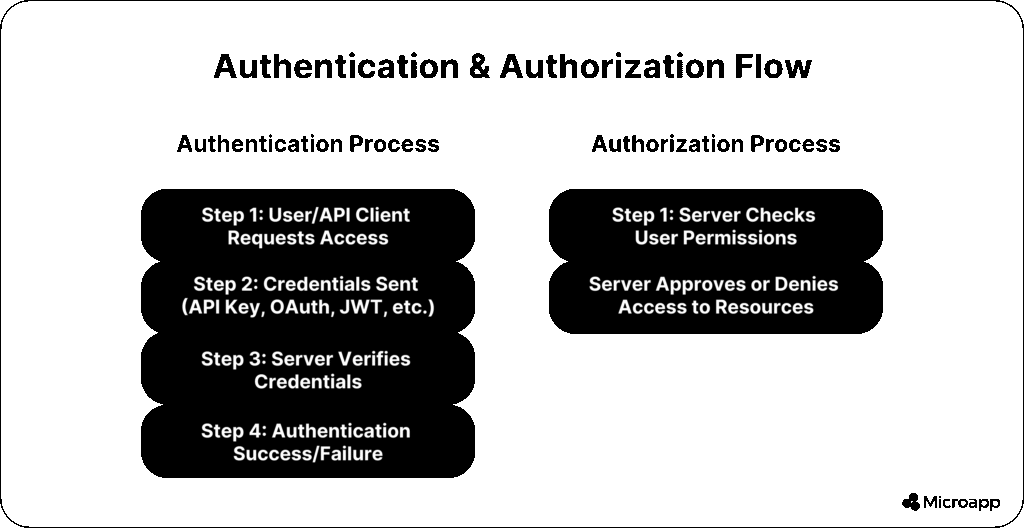
1. Authentication and Authorization
APIs may use OAuth, JWT, API keys, or custom tokens. Incorrect credentials or misconfigured permissions can prevent your tests from running.
How to Fix / Best Practices
- Use valid credentials and securely rotate tokens.
- Test both authorized and unauthorized access scenarios.
- Tools like Postman and Microapp REST API Testing Tool simplify token management.
📝 Tip: Always verify token expiration and automatic refresh in your automation scripts.
💬 When should I not use specific authentication methods?
Avoid using static API keys for production tests; instead, implement OAuth or JWT with automated token refresh for security.
2. Validating Data
Ensuring the data your API sends and receives is accurate, complete, and structured correctly is a common challenge.
Different formats (JSON, XML, CSV) and edge cases (missing, invalid, or corrupted data) add complexity.
How to Fix / Best Practices
- Prepare comprehensive test data covering all scenarios.
- Use validation tools or libraries to parse and verify responses.
- Compare actual vs. expected results consistently.
📝 Tip: Automate validation against schemas to catch format issues before production. Include boundary and edge-case testing to avoid data-related bugs.
💬 How do I validate data in API testing?
Utilize schema validation, automated comparisons, and test datasets to cover all edge cases.
3. Performance and Scalability
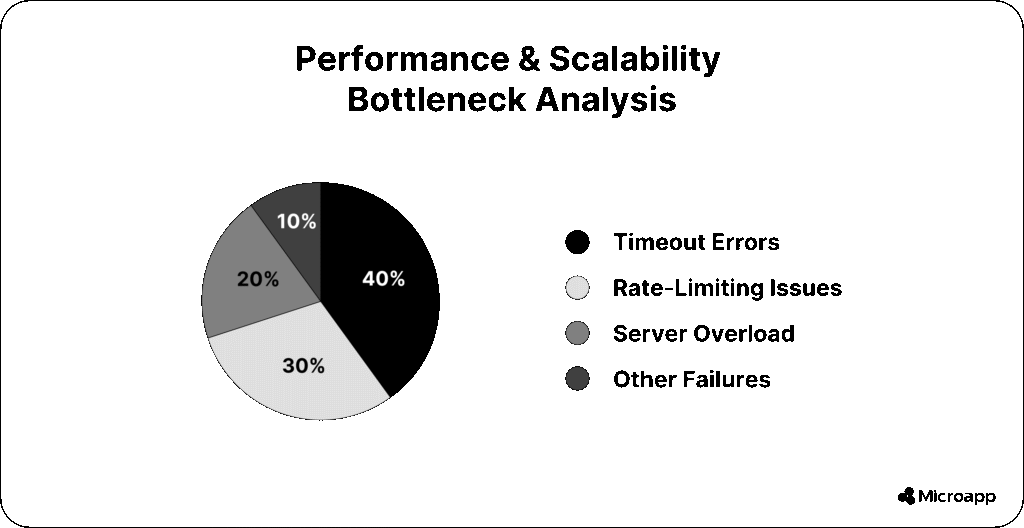
REST APIs must handle concurrent users, high traffic, and complex requests without failing. Poorly tested performance can lead to latency, errors, and downtime.
How to Fix / Best Practices
- Simulate realistic loads using tools like JMeter or Postman.
- Monitor latency, throughput, and error rates.
- Test under various network and server conditions.
📝 Tip: Track performance metrics over time to spot trends and potential bottlenecks.
💬 What are common API testing challenges?
Performance issues and scalability are common problems, alongside concerns related to authentication, data validation, documentation, and security.
4. Documentation and Specification
Incomplete or outdated API documentation makes it difficult to write practical tests. Precise specs (Swagger, OpenAPI, RAML) ensure testers know what endpoints expect.
How to Fix / Best Practices
- Keep specs updated with every API change.
- Use interactive documentation to generate test cases and mock servers.
- Validate your API against its specification automatically.
🔗 Related: Explore What is a Microapp? to understand how modular apps help streamline workflows.
📝 Tip: Use automated tools to sync your API documentation with your test suite for consistency.
5. Privacy and Security
APIs often handle sensitive data, making security a top priority. Vulnerabilities like broken authentication, injection attacks, or misconfigured endpoints can be costly.
How to Fix / Best Practices
- Implement hashing, encryption, certificates, and firewalls.
- Comply with HIPAA, GDPR, and other regulations.
- Include security tests in your automation suite.
📝 Tip: Regularly perform penetration testing and simulate potential attacks in your automated tests.
💬 Are REST APIs secure and accessible for all users?
Properly tested APIs are secure for authorized users. Always include authentication checks and simulate potential attacks in automated tests.
6. Automation and Integration
Building automation scripts is only the start; integrating them into CI/CD pipelines is critical for continuous testing. Scripts must be maintainable, reusable, and compatible with your software lifecycle.
How to Fix / Best Practices
- Utilize tools such as Jenkins or GitHub Actions to run automated tests.
- Maintain reusable test scripts and clear reports.
- Connect your tests to deployment pipelines for early detection of bugs.
📝 Tip: Integrate automated tests into your CI/CD process to catch issues before they reach production—Modularize test scripts for easier maintenance and updates.
7. Additional Challenges
- Data dependency & sequence issues: Ensure tests run in isolation or mock required states.
- Flaky tests & rate limiting: Monitor and retry intelligently.
- Environment setup & configuration: Automate environment provisioning where possible.
📝 Tip: Use containerized environments (Docker) for consistent test conditions and fewer environment-related failures.

Best Practices to Overcome REST API Automation Challenges
| Challenge | Best Practices | Tools / Tips |
|---|---|---|
| Authentication & Authorization | Use secure tokens, test valid/invalid access | Postman, Microapp REST API Testing Tool |
| Data Validation | Schema validation, comprehensive test cases | JSON Schema, automated scripts |
| Performance & Scalability | Load tests, latency checks, concurrent users | JMeter, Postman |
| Documentation | Keep specs updated, auto-generate tests | Swagger, OpenAPI |
| Security | Encryption, compliance, attack simulations | Penetration testing tools |
| Automation & Integration | CI/CD pipelines, reusable scripts | Jenkins, GitHub Actions, Microapp REST API Testing Tool |
Tools & Techniques for REST API Automation
- Postman: Popular for testing and scripting APIs.
- RestAssured: Java-based automation framework.
- JMeter: Performance and stress testing.
- Microapp REST API Testing Tool: Simplifies API automation and integration.
- CI/CD pipelines: Automate testing during build and deployment.
Streamline Your REST API Testing Today
REST API automation testing can be challenging, but by addressing issues related to authentication, data validation, performance, documentation, security, and integration, you can build resilient and scalable APIs.
Take action now: implement automation with Microapp REST API Testing Tool, follow best practices, and optimize your workflow for faster, more reliable results.
Explore more about Microapp tools and automation: Microapp home.